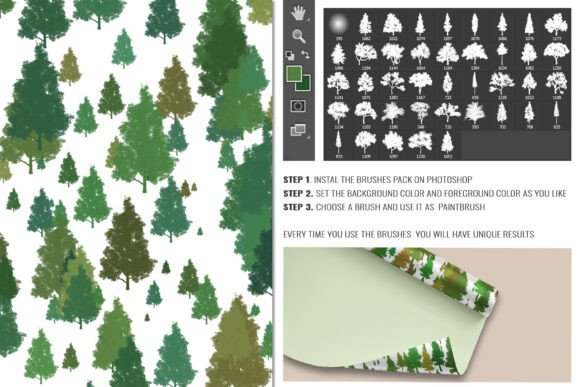
160 Silhouette Tree PS Brushes Bundle
Designing with nature-inspired elements can elevate any project, and the 160 Silhouette Tree PS Brushes Bundle is a powerful tool for creatives looking to add depth, texture, and organic appeal to their work. Whether you're creating digital art, designing marketing materials, or working on editorial layouts, this brush set offers flexibility and visual interest without overwhelming your composition.
This bundle includes a total of 160 brushes divided into four main sets: 40 Silhouette Tree PS Brushes, 40 with Scatter Dynamics, 40 Silhouette Tree Branch PS Brushes, and another 40 with Scatter Dynamics. Each brush is designed to be easily editable in Photoshop, making it ideal for designers who want creative control without the hassle of manual adjustments.
Visual Style and Design Personality
The brushes in this pack are minimalist yet expressive. Silhouette trees and branches provide a clean, modern aesthetic that works well in both abstract and realistic design contexts. The inclusion of Scatter Dynamics allows for more organic placement, mimicking natural growth patterns and wind effects. This subtle randomness brings a sense of movement and life to static images, making them ideal for backgrounds, overlays, and texture layers.
These brushes are especially useful when you want to evoke a sense of calm, growth, or connection to nature—perfect for wellness brands, eco-conscious startups, lifestyle bloggers, and creative professionals working in nature-related niches.
Applications Across Design Projects
One of the strongest features of the 160 Silhouette Tree PS Brushes Bundle is its versatility. It can be used in a wide variety of design environments, including:
- Logo design – Add subtle natural elements to brand marks without overpowering the core message.
- Editorial design – Enhance magazine spreads or book covers with layered brush effects that draw the eye.
- Packaging design – Create botanical or rustic-themed packaging for food, beauty, or artisan products.
- Web design – Use brushes as background textures or decorative dividers to add visual interest without slowing page load times.
- Social media graphics – Quickly add seasonal or nature-themed visuals to Instagram posts, Pinterest graphics, or Facebook banners.
Because the brushes are vector-based and scalable, they maintain quality at any size, making them equally effective in print and digital formats.
How These Brushes Impact Design Perception
Visual elements like brushes play a crucial role in shaping how your audience perceives your brand or message. Thoughtful use of the 160 Silhouette Tree PS Brushes Bundle can:
- Enhance readability – When used as background elements or dividers, these brushes can guide the viewer’s eye and improve visual hierarchy.
- Build brand recognition – Consistent use of a signature brush style across marketing materials helps reinforce brand identity.
- Add professionalism – High-quality brushes signal attention to detail, which can elevate the perceived value of your work.
- Influence emotional response – Nature-inspired visuals often evoke feelings of peace, growth, and trust—ideal for brands in wellness, sustainability, or outdoor industries.
However, it’s important to use these brushes thoughtfully. Overuse or poor placement can clutter a design and detract from the main message. Always consider balance, contrast, and alignment when incorporating brush elements.
Practical Tips for Using the Brush Bundle
Here are some actionable recommendations for getting the most out of the 160 Silhouette Tree PS Brushes Bundle:
- Test brush compatibility – Try them on different backgrounds and layer styles to see how they interact with your design elements.
- Experiment with layer blending modes – Soft Light, Multiply, or Overlay can enhance the natural look of tree silhouettes and branches.
- Use Scatter Dynamics creatively – Adjust settings like size jitter, scatter, and rotation to create custom foliage patterns that feel organic and dynamic.
- Pair with clean fonts – Since the brushes have a visual presence, it’s best to pair them with simple, modern fonts that won’t compete for attention.
- Check licensing – Make sure the brushes are cleared for commercial use, especially if you're working on client projects or selling digital products.
The included PSD file is well-organized and comes with instructions, making it easy for both beginners and experienced designers to integrate these brushes into their workflow quickly.
Final Thoughts
The 160 Silhouette Tree PS Brushes Bundle isn't just a collection of brushes—it's a design toolkit that brings nature into your creative process. Whether you're designing a nature-themed logo, creating a seasonal social media campaign, or adding depth to a digital illustration, this brush set offers practical value with a touch of elegance.
As with any design asset, the key is to use it intentionally. Let the brushes enhance your work rather than dominate it. With a little experimentation and attention to detail, you can create designs that feel both professional and personal—perfect for today’s visual storytelling needs.