Ice Shatter Photoshop Brushes: A Strategic Tool for Visual Impact
Understanding the Ice Shatter Photoshop Brushes
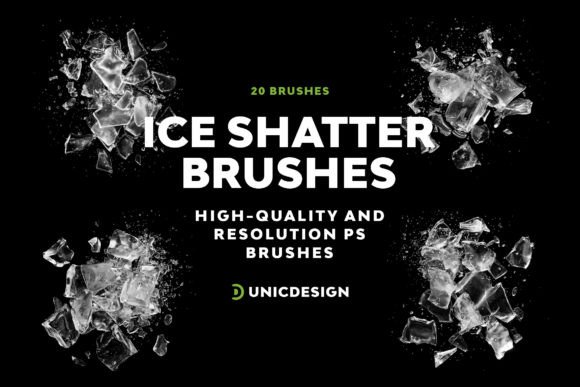
The Ice Shatter Photoshop Brushes are a premium collection of 20 high-resolution brushes designed to enhance digital artwork with a realistic and visually compelling ice shatter effect. Each brush is crafted with precision, ensuring clarity and adaptability across a range of design projects. Whether you're a seasoned graphic designer or just starting out, this set offers both quality and accessibility, supporting Photoshop versions from CS6 through the latest CC 2022 release.
What makes this set particularly valuable is its versatility. The variety of brush styles allows for nuanced application—whether you're looking to add a subtle icy accent or a dramatic shatter effect. The included Readme file provides clear, step-by-step guidance, making the learning curve gentle even for beginners.
Strategic Use in Design and Branding
Visual storytelling is a core component of branding and communication. The Ice Shatter Photoshop Brushes can be a strategic asset when used intentionally to support brand identity, product presentation, or thematic campaigns. For instance, a winter-themed marketing campaign for a beverage brand could leverage these brushes to create frosty, eye-catching visuals that resonate with seasonal messaging.
Designers working in e-commerce can use these brushes to elevate product imagery—especially for items like jewelry, cosmetics, or cold-weather gear. A subtle application of the ice effect can imply luxury, purity, or freshness, aligning with the brand’s value proposition.
Planning and Contextual Integration
Before incorporating the Ice Shatter Photoshop Brushes into a project, it's important to consider the broader design context. Ask yourself:
- Does the ice shatter effect align with the overall visual tone of the project?
- Is the effect being used to enhance clarity or distract from the main message?
- Have I considered how this effect will appear across different platforms and devices?
These questions help ensure that the use of the brushes is not merely decorative but purposeful. Thoughtful integration requires planning, especially when working on multi-layered compositions or animations where the ice effect might be animated or transitioned subtly.
Practical Application Tips
- Start small: Begin with a single brush to understand how the texture interacts with your design elements.
- Layer strategically: Combine different brushes to build depth without overwhelming the composition.
- Test in context: Preview your design in both high and low resolution to ensure clarity across devices.
- Adjust opacity and blending modes: This allows for more natural integration with backgrounds and subjects.
When to Use the Ice Shatter Photoshop Brushes
The effectiveness of these brushes lies in their appropriate application. They are ideal for:
- Creative projects with a cold or winter theme
- Product enhancements where a crystalline or luxurious feel is desired
- Visual transitions in digital media or presentations
- Adding dynamic effects to typography or logos
However, they may not be suitable for minimalist designs or projects where subtlety is key. Overuse can lead to visual clutter, diluting the intended message or aesthetic.
Long-Term Value and Learning Curve
One of the standout features of the Ice Shatter Photoshop Brushes is their adaptability across Photoshop versions, ensuring long-term usability as software evolves. For professionals, this means a reliable tool that grows with their workflow. Educators and students can benefit from the set’s ease of use and the included Readme file, which supports self-guided learning and experimentation.
Over time, designers can build a personal style by mastering how each brush interacts with different textures, lighting, and layering techniques. This not only improves technical proficiency but also enhances creative decision-making—helping users move from applying effects randomly to using them with intention and impact.
Support and Resource Accessibility
UnicDesign’s commitment to customer support ensures that users are not left to figure things out on their own. Whether you're troubleshooting installation or seeking advice on advanced techniques, the support team is accessible via the provided contact link. This level of service adds significant value, especially for independent creators and small teams who may not have in-house technical support.
Avoiding Common Pitfalls
While the Ice Shatter Photoshop Brushes offer impressive visual potential, using them without a clear objective can lead to ineffective results. Common mistakes include:
- Overusing effects to the point of distraction
- Misaligning the brush style with the project’s tone or audience
- Ignoring scalability and resolution in final outputs
To avoid these issues, always start with a clear visual goal and test your designs in multiple contexts. Treat the brushes as a tool to support your creative vision, not as the vision itself.
Intentional Use for Better Outcomes
The most successful applications of the Ice Shatter Photoshop Brushes come from intentional, goal-driven design. Whether you're enhancing a logo, creating a themed poster, or developing digital assets for a campaign, the key is to align the brush use with your creative or business objectives.
Consider the following strategic questions:
- How does the ice effect support the emotional tone of the design?
- Will this effect help the design stand out in its intended environment?
- Am I using the brushes in a way that reflects my brand’s visual language?
Answering these thoughtfully ensures that the brushes enhance rather than complicate your design process.
Final Thoughts: A Tool Worth Investing In
The Ice Shatter Photoshop Brushes are more than just a visual enhancement—they’re a strategic resource for anyone looking to elevate their design work with purpose and precision. Their high-resolution quality, compatibility across Photoshop versions, and user-friendly design make them a versatile addition to any creative toolkit.
For entrepreneurs, marketers, and designers alike, the ability to apply visual effects with intention can make a meaningful difference in how content is perceived and engaged with. By approaching the Ice Shatter Photoshop Brushes with a strategic mindset, users can unlock long-term value and creative growth.