Enhance Your Digital Art with Paint Stroke Photoshop Brushes
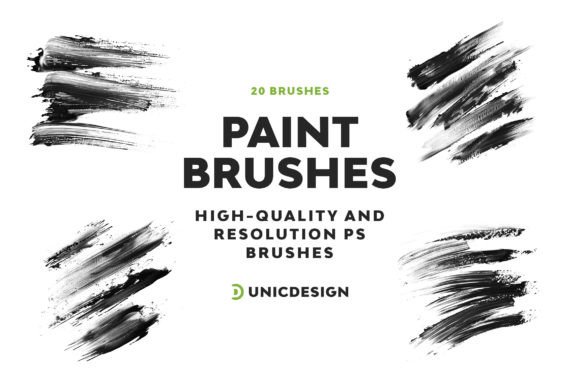
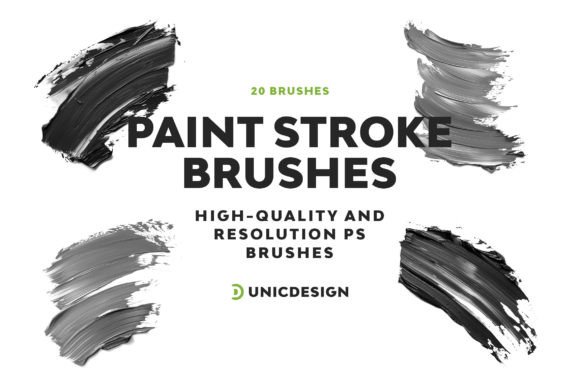
Digital artistry has evolved dramatically, and tools like Adobe Photoshop continue to empower creators of all levels. Among the many resources available, Paint Stroke Photoshop Brushes stand out as a versatile and high-quality option for those looking to add texture, depth, and authenticity to their work. This collection of 20 paint stroke brushes is designed with precision, offering a resolution of approximately 2000px, making them ideal for both detailed illustrations and broad creative strokes.
What Makes These Brushes Unique?
Each brush in the Paint Stroke Photoshop Brushes set is crafted to replicate the organic feel of traditional painting while maintaining the flexibility of digital tools. Their high resolution ensures crisp, clean results even at larger sizes, and their intuitive design makes them easy to integrate into your workflow—regardless of your experience level.
These brushes are not just about aesthetics; they're built for functionality. The set includes 20 variants, each offering a different texture and stroke style, allowing you to mix and match based on your project's needs. Whether you're aiming for a subtle wash of color or a bold, textured effect, this collection provides the tools to bring your vision to life.
Why This Matters to Different Creators
Depending on your background and goals, the value of these brushes may vary. Here’s how different users might approach and benefit from the Paint Stroke Photoshop Brushes set:
Beginners and Hobbyists
If you're just starting out or dabbling in digital art as a hobby, these brushes offer a gentle learning curve. They’re easy to apply and don’t require advanced knowledge of brush settings or blending modes. You can focus more on exploring your creativity rather than getting bogged down by technical details. The included Readme file walks you through installation and basic usage, so you can start creating right away.
- Example: A hobbyist creating digital greeting cards can use these brushes to add hand-painted textures without needing to master complex Photoshop techniques.
Professional Artists and Designers
For experienced users, the Paint Stroke Photoshop Brushes offer a reliable and high-quality texture solution that can be incorporated into client projects, concept art, or digital illustrations. Their high resolution ensures they scale well for print or web, and their variety allows for customization and layering to achieve unique results.
- Example: A freelance illustrator working on a book cover might layer multiple brush strokes to simulate canvas texture, enhancing the visual appeal of the final image.
Educators and Students
These brushes can be a valuable teaching tool for educators and a great resource for students learning digital painting techniques. The simplicity of the brushes allows for focused lessons on texture, composition, and brush dynamics without overwhelming learners.
- Example: An art teacher could use the brushes to demonstrate how different brush types affect the mood and style of a digital painting.
Entrepreneurs and Small Business Owners
For those creating marketing materials, social media content, or product mockups, these brushes offer an easy way to enhance visuals without requiring extensive design skills. Their compatibility with Photoshop versions from CS6 to CC 2022 ensures they can be used across different setups, and the included support makes troubleshooting straightforward.
- Example: A small business owner designing a promotional poster can apply a brush stroke to create a hand-painted border, adding a personal and artistic touch to the design.
Key Features That Stand Out
Several factors contribute to the overall value of the Paint Stroke Photoshop Brushes set, and understanding these can help you determine if they align with your creative goals:
- High-Resolution Quality: At approximately 2000px, these brushes maintain clarity and sharpness even when scaled up for large-format prints or web banners.
- Compatibility: Designed to work seamlessly with Photoshop CS6 through CC 2022, they’re accessible to a wide range of users without the need for software upgrades.
- Easy to Use: The brushes are pre-configured for optimal performance, and the Readme file includes clear instructions for installation and basic usage.
- Customer Support: UnicDesign offers 24/7 unlimited support, ensuring that any technical issues or questions can be addressed quickly and efficiently.
How to Decide If These Brushes Are Right for You
When evaluating the Paint Stroke Photoshop Brushes, consider the following aspects based on your needs:
- Beginners: Look for simplicity and clear instructions. These brushes deliver both, making them a great starting point.
- Professionals: Prioritize quality and versatility. These brushes offer high resolution and multiple stroke styles for flexible use.
- Educators: Seek tools that are both instructive and easy to demonstrate. The brush set supports both learning and teaching digital texture techniques.
- Business Users: Focus on reliability and compatibility. These brushes work across Photoshop versions and are backed by responsive support.
Real-World Applications
Here are a few practical examples of how different users might apply the Paint Stroke Photoshop Brushes in their work:
- Bloggers: Enhance infographic visuals with textured backgrounds that draw attention without overpowering the content.
- Freelancers: Use brush strokes to add painterly effects to digital portraits or stylized illustrations for clients.
- Marketers: Create engaging social media posts with hand-painted elements that stand out in a crowded feed.
- Artists: Blend brush textures into digital canvases to simulate traditional media like oil or watercolor.
Final Thoughts
The Paint Stroke Photoshop Brushes are more than just a collection of tools—they’re a bridge between traditional artistry and digital convenience. Whether you're a beginner exploring digital painting for the first time or a professional looking for high-quality textures, this set offers something valuable for a wide range of users. With its combination of quality, ease of use, and ongoing support, it's a resource worth considering for anyone looking to elevate their creative work in Photoshop.