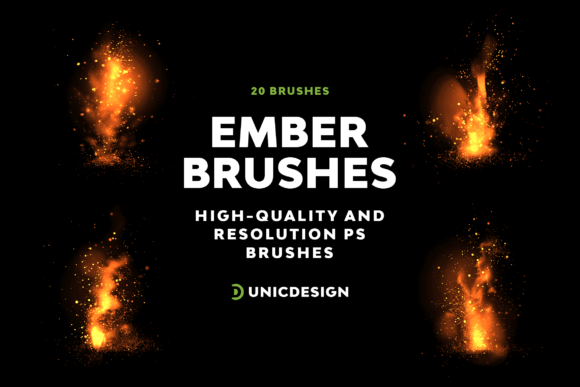
Fireball Photoshop Brushes: Spark Creativity with Real-World Impact
More Than Just Visual Flair
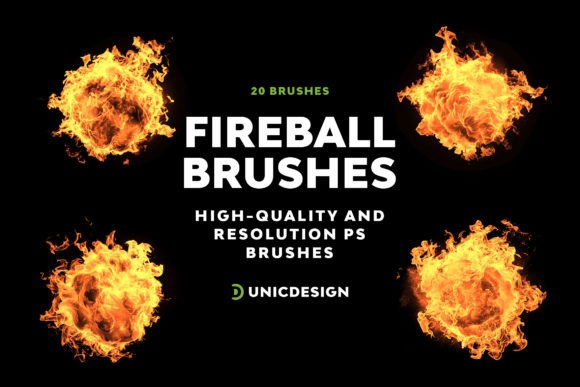
Fireball Photoshop Brushes aren’t just another set of flashy effects. They’re a practical toolset for creators who want to add energy, drama, or visual impact to their work. Whether you're designing a poster, enhancing a photo, or creating digital art, these brushes offer a way to inject movement and intensity without the hassle of drawing flames from scratch.
Each of the 20 brushes in the set is crafted with precision, reaching up to 2000 pixels in resolution. This means your fire effects stay sharp, even when scaled for print or high-resolution web use. The variety ensures you’re not repeating the same flame pattern across projects. From tight bursts to long trails, you’ll find a brush that fits the mood and context you’re aiming for.
When and Where Fireball Photoshop Brushes Shine
Let’s talk about real situations where these brushes make a difference. Imagine you’re a freelance designer working on a concert poster for a rock band. You need something that pops, something that screams energy. A fireball effect layered behind the band name or in the background can instantly elevate the design from “just okay” to “unforgettable.”
Or picture a digital artist creating a fantasy scene where a dragon unleashes a fiery blast. Drawing realistic fire manually takes time and skill. With Fireball Photoshop Brushes, you can layer and blend ready-made flames, saving hours while maintaining quality. This isn’t just about convenience—it’s about maintaining creative flow without getting bogged down in technical details.
Use Cases Across Different Creative Worlds
- Marketing materials: Add fire effects to sale banners, social media posts, or product mockups to draw attention and create urgency.
- Video game assets: Indie developers can use these brushes to quickly create fire spells, explosions, or environmental effects for 2D games.
- Blog graphics: Content creators can spice up their thumbnails or featured images with a fiery touch that stands out in feeds.
- Photography editing: Enhance dramatic shots—think action photography or conceptual art—by blending fire into the scene.
- Personal art projects: Whether you're a hobbyist or a seasoned illustrator, these brushes give you more creative freedom without reinventing the wheel.
Who Actually Benefits From Fireball Photoshop Brushes?
These brushes serve a wide range of users, each with their own unique needs. Let’s break it down:
- Graphic designers: Speed up your workflow by using pre-made, high-quality fireball effects instead of rendering or drawing flames manually.
- Photographers: Use fireball brushes to enhance conceptual or dramatic photo edits, especially in genres like cosplay, action, or surreal photography.
- Content creators: Whether you're making YouTube thumbnails, Instagram stories, or blog banners, these brushes help your visuals stand out without needing advanced Photoshop skills.
- Students and educators: Teaching visual design or digital art? These brushes provide hands-on tools for learning layer blending, masking, and dynamic effects.
- Small business owners: If you're creating your own promotional material, these brushes can help you look more professional without hiring a designer.
How It Works in Real Projects
Let’s say you're a blogger who writes about tech gadgets. You're launching a feature called “The Hottest New Releases” and want a fiery banner to match the theme. Instead of searching for stock images or trying to mimic fire with gradients, you can use one of the Fireball Photoshop Brushes to create a custom header that’s both on-brand and eye-catching.
Or maybe you're a digital artist creating a book cover for a fantasy novel. You want a scene where a character launches a fire spell mid-battle. Using these brushes, you can quickly add realistic, dynamic flames that enhance the tension without needing to paint each flicker by hand.
What to Consider Before Using Fireball Photoshop Brushes
Before diving in, it’s worth thinking about a few practical points to make sure this set is the right fit for your needs:
- Compatibility: These brushes work with Photoshop versions from CS6 through CC 2022, so check your software version before downloading.
- Learning curve: While the brushes are easy to use, understanding how to blend them effectively into your designs takes a little practice. The included Readme file helps guide you through setup and basic use.
- File size: High-resolution brushes can affect performance, especially if you're using multiple layers or working on a less powerful machine. Test them on smaller projects first.
- Support: If you run into any issues, UnicDesign offers support via the link in the Readme. It’s reassuring to know help is available if you need it.
Getting the Most Out of Fireball Photoshop Brushes
One of the best things about this set is that it’s not just about slapping on a fireball and calling it done. These brushes are designed to be layered, adjusted, and blended with your artwork. You can tweak colors, opacity, and blending modes to match your scene. For example, using a blue fireball brush with a color overlay can create a sci-fi plasma effect. Or desaturating a flame can make it look like an old-school explosion from a vintage comic.
They’re also great for motion graphics. If you’re creating a short animation or GIF in Photoshop, having multiple fireball variations lets you simulate movement without redrawing each frame from scratch.
Final Thoughts: A Tool That Earns Its Place
Fireball Photoshop Brushes might seem like a small addition to your toolkit, but they offer a big return on investment. They save time, boost creativity, and help you deliver more compelling visuals—whether you're working professionally or just for fun.
And because they come with clear instructions and support, even users who aren’t Photoshop experts can get started quickly. Whether you're a marketer, a designer, a blogger, or someone who just enjoys making cool visuals, this brush set is worth considering. It’s not about flashy effects for the sake of it—it’s about giving your work more impact, more emotion, and more fire, in every sense of the word.