Blast Photoshop Brushes for Dynamic Visual Design
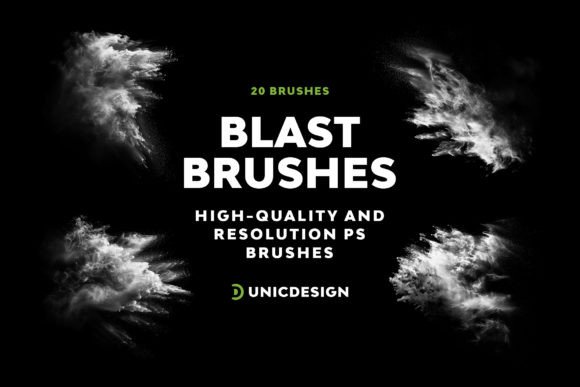
Creating visually arresting artwork often comes down to the tools you use. If you're looking to inject energy and movement into your compositions, Blast Photoshop Brushes offer a compelling solution. This set of 20 high-resolution brushes brings a bold, explosive aesthetic to your digital work, allowing you to elevate everything from graphic designs to social media visuals with minimal effort and maximum impact.
Each brush in the collection is crafted at a generous 2000 px size, ensuring clarity and detail even in large-scale projects. The visual personality of these brushes leans toward the dramatic—think shockwaves, bursts, and dynamic motion trails that command attention. Whether you're designing a poster, enhancing a logo concept, or adding visual flair to a digital campaign, these brushes provide a professional edge without requiring advanced technical skills.
What sets Blast Photoshop Brushes apart is their accessibility. You don't need to be a Photoshop expert to use them effectively. With just a few clicks, you can apply complex visual effects that would otherwise take hours to replicate manually. The intuitive interface makes integration into your workflow seamless, and the included Readme file offers clear instructions to help you get started quickly. Plus, 24/7 expert support ensures any questions you have will be addressed promptly.
Perfect for Diverse Creative and Commercial Applications
These brushes aren't limited to a single design niche. Their versatility makes them ideal for a wide range of creative and commercial uses. Here are some of the most effective applications:
- Logo design – Add motion and drama to brand visuals for a memorable impression.
- Social media graphics – Enhance posts with eye-catching effects that stand out in crowded feeds.
- Editorial design – Use them in magazine layouts or editorial illustrations to emphasize action or energy.
- Packaging design – Create dynamic backgrounds or accents that elevate product presentation.
- Web design – Integrate explosive elements into hero banners, buttons, or promotional graphics.
Because of their high resolution and flexible style, these brushes work equally well in both print and digital environments. Whether you're crafting a poster for a music festival or designing a promotional banner for an online campaign, Blast Photoshop Brushes help you maintain a professional, cohesive aesthetic across platforms.
How These Brushes Impact Design Perception and Engagement
In visual design, small details often make the biggest difference. The right brush effect can shift a design from ordinary to unforgettable. Blast Photoshop Brushes contribute to this transformation by enhancing visual hierarchy, reinforcing brand tone, and drawing the viewer's eye to key focal points.
When used thoughtfully, brush effects can influence how your audience perceives your work. A well-placed explosion of light or motion can suggest excitement, innovation, or urgency—ideal for branding in industries like entertainment, tech, or fitness. Moreover, because these brushes offer a consistent style across variations, they help maintain visual unity in multi-platform campaigns.
From a practical standpoint, these brushes also support readability and engagement. In designs where text is layered over complex backgrounds, for example, a subtle brush texture underneath can make the copy stand out without overwhelming the layout. This subtle contrast can significantly improve readability and user experience, especially in digital formats.
Choosing and Using Blast Photoshop Brushes Effectively
While the brushes are easy to apply, thoughtful implementation ensures the best results. Here are some practical tips for integrating Blast Photoshop Brushes into your design workflow:
- Evaluate your project's tone – Not every design needs high drama. Consider the mood and message before applying brush effects.
- Test brush pairings – Combine different brush styles to create layered, dimensional visuals without overloading the composition.
- Review included styles – Each of the 20 brushes has a unique character. Spend a few minutes browsing the options to find the right match for your project.
- Consider scale and resolution – These brushes are optimized for high-resolution output, but always test them at actual print or screen size to ensure clarity.
- Respect commercial licensing – The brushes are cleared for commercial use, but be sure to review the licensing terms included in the Readme file to stay compliant.
For example, if you're working on a sports-related design, using a brush with a motion trail or impact burst can reinforce the theme of movement and competition. In contrast, a softer, more diffused brush might work better for lifestyle or wellness branding, where the goal is to convey energy without intensity.
Final Thoughts on Design Impact and Long-Term Value
Design assets like Blast Photoshop Brushes are more than just visual tools—they’re investments in your creative efficiency and output quality. When you have a reliable set of brushes that work across versions of Photoshop from CS6 to CC 2022, you're equipped to deliver consistent, high-impact visuals with less effort.
These brushes also contribute to brand recognition over time. If you use them strategically across multiple projects, they become part of your visual signature. This subtle repetition builds familiarity, which is key to long-term audience engagement and brand trust.
Whether you're a designer, marketer, content creator, or small business owner, the ability to enhance your visuals with professional-grade effects is invaluable. With Blast Photoshop Brushes, you gain access to a powerful, user-friendly toolset that supports both your creative exploration and your professional goals.