Light Ray Photoshop Brushes: Elevate Your Design Lighting
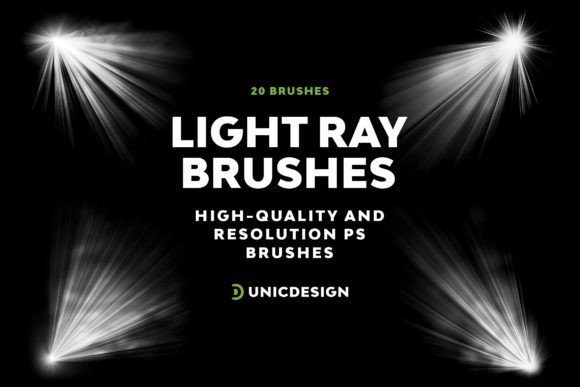
Adding the right lighting effects can transform a flat design into something dynamic and visually compelling. The Light Ray Photoshop Brushes set offers a powerful way to introduce realistic, high-impact light elements into your work. Each of the 20 brushes in this collection is crafted with precision, delivering a resolution of approximately 2000 pixels to ensure every glow, flare, and ray stands out clearly without losing quality. These brushes are more than just visual enhancements—they’re tools that help you guide attention, evoke emotion, and create atmosphere in your compositions.
Designed for Versatility and Clarity
What sets the Light Ray Photoshop Brushes apart is their adaptability across a wide range of design contexts. Whether you're enhancing a digital illustration, adding depth to a photo composite, or crafting a dynamic poster, these brushes offer the flexibility to work seamlessly across projects. Each brush has been carefully curated to provide a distinct lighting effect—from soft glows and sharp rays to subtle lens flares and radiant bursts. This variety allows you to layer and blend effects for a more natural, photorealistic outcome.
Where These Brushes Shine Brightest
These brushes are particularly effective in environments where visual impact and clarity are essential. For branding projects, they can be used to highlight key elements in logo presentations or to add a touch of sophistication to brand collateral. In editorial design, they help emphasize focal points in magazine layouts or online articles. For social media graphics, the brushes can be layered behind text or imagery to create vibrant, eye-catching visuals that stand out in a crowded feed.
Photographers and digital artists also benefit from the Light Ray Photoshop Brushes when enhancing portraits or creating surreal composites. The high resolution and clean edges of each brush ensure that even at large print sizes, the effects maintain their integrity. Whether you're working on packaging design, web design, or personal art projects, these brushes integrate smoothly into your workflow without compromising performance.
Enhancing Visual Hierarchy and Engagement
Lighting isn't just about aesthetics—it plays a functional role in how your audience interacts with your design. By using the Light Ray Photoshop Brushes, you can subtly direct the viewer's gaze, enhance contrast, and improve the readability of layered compositions. For example, applying a soft glow behind text can make it pop without overwhelming the background. Similarly, adding a flare to a central image can draw attention and create a sense of movement.
From a branding perspective, consistent use of lighting effects contributes to a cohesive brand identity. When applied thoughtfully across marketing materials, websites, and packaging, these brushes help reinforce brand recognition through a unified visual language. They also elevate the perceived professionalism of a design, signaling attention to detail and quality—key factors in how audiences judge the credibility of a brand or creative work.
Practical Tips for Using Light Ray Photoshop Brushes
Getting the most out of the Light Ray Photoshop Brushes involves more than just selecting and applying. Here are a few practical recommendations:
- Experiment with blending modes: Try using the brushes with modes like Overlay, Soft Light, or Screen to achieve different lighting effects without overpowering your base image.
- Layer for depth: Combine multiple brushes to build complex lighting scenarios. For instance, layer a soft glow with a sharp flare to simulate natural light sources.
- Adjust opacity and flow: Don’t overdo it. Subtle applications often yield the most realistic results. Adjusting these settings allows for more nuanced integration with your design.
- Test across platforms: If your design will be used both digitally and in print, preview how the lighting effects translate in both environments to ensure consistency.
Compatibility and Support for Long-Term Use
One of the standout features of the Light Ray Photoshop Brushes is their compatibility with multiple versions of Photoshop—from CS6 all the way up to CC 2022. This ensures that whether you're working on an older machine or the latest software, you can integrate these brushes without technical hurdles. Additionally, the included Readme file provides clear instructions and helpful tips for installation and usage. Should you encounter any issues or have questions about how to use a specific brush, UnicDesign’s 24/7 support team is available to assist, ensuring a smooth experience from download to final output.
Real-World Applications and Creative Exploration
Consider how lighting can enhance a music poster. Using a radial light brush behind the artist's name can create a dramatic spotlight effect, drawing attention exactly where you want it. In a product mockup, a subtle glow can simulate studio lighting, making the item appear more premium and professionally photographed. Even in web banners or email headers, these brushes can be used to highlight calls to action or promotional text.
For those working with creative fonts or display fonts, pairing them with light effects can dramatically increase their visual impact. A bold, modern typeface used for a headline gains even more presence when backlit with a soft glow brush. Similarly, a script font or handwritten font used in a greeting card design can be enhanced with subtle rays that mimic natural window light, adding warmth and depth.
Final Thoughts: A Must-Have Design Asset
The Light Ray Photoshop Brushes are more than just a set of tools—they're an essential part of a modern designer's toolkit. Whether you're crafting brand identity materials, enhancing digital illustrations, or building social media visuals, these brushes offer a level of polish and realism that can elevate your work. With their high resolution, thoughtful design, and user-friendly format, they deliver real-world value for both personal and commercial font projects. And with ongoing support and compatibility across Photoshop versions, they're built to last in your creative workflow.