Bokeh Photoshop Brushes: Elevate Your Design Projects with UnicDesign
Whether you're a seasoned graphic designer or just starting to explore the world of digital art, incorporating Bokeh Photoshop Brushes into your workflow can open up a world of creative possibilities. These brushes are more than just visual effects—they're powerful tools that can enhance your compositions, add depth, and bring a professional polish to your work.
What Are Bokeh Photoshop Brushes?
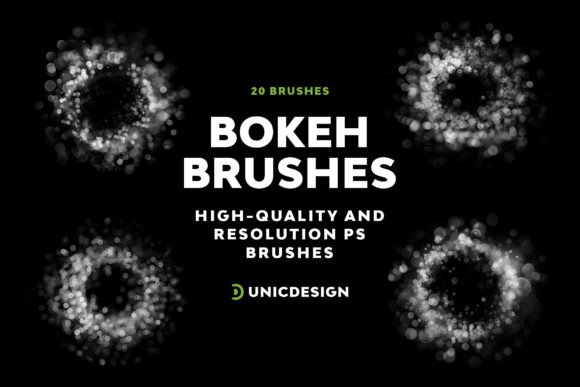
Bokeh, a term borrowed from photography, refers to the soft, out-of-focus background blur that creates a dreamy, cinematic effect. In Photoshop, bokeh brushes simulate this look digitally, allowing designers to replicate the aesthetic without needing a high-end camera. The UnicDesign Bokeh Photoshop Brushes pack includes 20 high-resolution brushes, each crafted at approximately 2000 pixels, ensuring clarity and sharpness even in large-scale projects.
These brushes are ideal for adding atmospheric depth to portraits, enhancing digital illustrations, or creating eye-catching backgrounds for web and print media. With a variety of shapes and intensities, you can blend, layer, and adjust the bokeh effects to suit your unique vision.
Why Designers Love Using Bokeh Brushes
Designers are always on the lookout for tools that streamline their workflow while boosting visual impact. The Bokeh Photoshop Brushes from UnicDesign deliver on both fronts. Here's why they’ve become a go-to resource:
- High-resolution quality ensures crisp results across all project types.
- Seamless integration with Photoshop CS6 through CC 2022 makes them accessible to a wide user base.
- Diverse brush set offers flexibility in style and application.
- Easy to use, even for beginners, thanks to the included Readme guide.
- 24/7 support ensures help is always available when you need it.
How to Use Bokeh Photoshop Brushes Effectively
Using bokeh brushes effectively requires a bit of technique, but once you get the hang of it, they can become a staple in your creative toolkit. Here's a simple guide to get you started:
- Load the brushes into Photoshop by navigating to the Brushes panel and selecting "Load Brushes."
- Create a new layer above your main image to keep your edits non-destructive.
- Choose a brush that complements the mood and style of your design.
- Adjust the brush size, opacity, and flow based on the desired intensity.
- Paint strategically over areas where you want to create depth or draw attention.
For example, if you're working on a portrait, placing soft bokeh lights around the edges can create a magical glow. In a poster design, using bokeh as a background can help your text or subject stand out more prominently.
Practical Applications Across Creative Industries
Bokeh brushes aren’t just for photographers or digital artists—they’re versatile enough to be used across a range of creative fields. Here are a few examples:
- Graphic Design: Use bokeh effects to enhance website headers, promotional banners, and social media posts.
- Photography Editing: Add depth and dimension to portrait or wedding photography with subtle background blur.
- UI/UX Design: Incorporate bokeh into background elements for modern, immersive app interfaces.
- Marketing Materials: Boost the visual appeal of flyers, posters, and product presentations.
Because of their adaptability, Bokeh Photoshop Brushes can easily fit into any digital artist’s workflow—whether you're designing for print, web, or mobile platforms.
Compatibility and Ease of Use
One of the standout features of the UnicDesign bokeh brush set is its compatibility with a wide range of Photoshop versions. From CS6 to the latest CC 2022, these brushes work seamlessly across versions, ensuring that no matter your setup, you can enjoy the same high-quality results.
This broad compatibility is especially useful for freelancers and agencies that may work across multiple systems or versions of Photoshop. It also means you won't have to worry about updating your software just to use these brushes—everything is optimized for smooth performance right out of the box.
Getting Started with the Readme Guide
Even if you're new to using brushes in Photoshop, the included Readme file makes setup and usage straightforward. It walks you through the installation process step by step and offers tips on how to get the most out of each brush. Whether you're a beginner or an experienced designer, this guide ensures you're never left guessing.
Additionally, the Readme file contains a direct link to UnicDesign’s support team, which is available 24/7 to help with any questions or issues you may encounter. This level of customer care is rare and speaks volumes about the brand’s commitment to user satisfaction.
Real-World Scenarios Where Bokeh Brushes Shine
Let’s take a look at how bokeh brushes can be applied in real-world design situations:
- Wedding Photography: Enhance the romantic atmosphere of bridal portraits by adding soft light bokeh effects in the background.
- Product Photography: Use bokeh to subtly blur distracting elements and highlight the product front and center.
- Website Design: Create visually engaging hero sections with bokeh backgrounds that draw the viewer’s eye.
- Event Invitations: Add a touch of elegance to digital invites with carefully placed bokeh highlights.
These are just a few examples of how the Bokeh Photoshop Brushes can be used creatively across different design disciplines. Once you start experimenting, the possibilities are truly endless.
Final Thoughts: Unleash Your Creativity with Confidence
The UnicDesign Bokeh Photoshop Brushes offer a powerful yet accessible way to elevate your design work. With their high resolution, intuitive usability, and wide compatibility, they’re a valuable addition to any designer’s toolkit. Whether you're looking to enhance your portfolio, streamline your workflow, or simply explore new creative avenues, these brushes provide the flexibility and quality you need.
Don’t let technical limitations hold back your imagination. With 20 unique brush options and dedicated support, you have everything you need to dive into the enchanting world of bokeh graphics. Let your creativity shine and discover what’s possible when you combine artistic vision with the right tools.