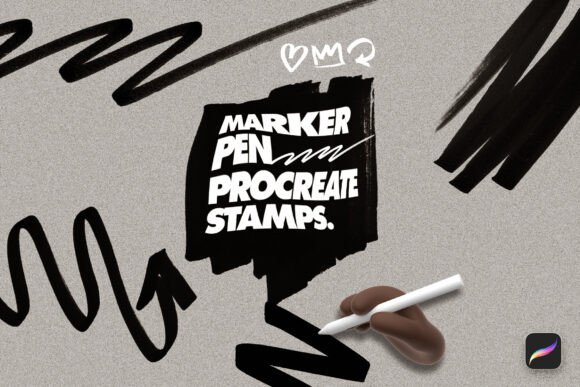
Enhancing Digital Creativity with Marker Pen Procreate Stamp Brushes
For digital artists, illustrators, and designers working within the Procreate app, efficiency and creative flexibility are essential. The Marker Pen Procreate Stamp Brushes Pack by Layerform offers a curated set of 100 hand-drawn stamp brushes that streamline the creative process while maintaining a natural, expressive aesthetic. These brushes are more than just decorative elements—they’re practical tools that fit into a broader digital workflow, helping creators maintain consistency, speed up production, and add organic textures to their work.
Understanding the Marker Pen Procreate Stamp Brushes Pack
The Marker Pen Procreate Stamp Brushes Pack is a premium collection designed specifically for the Procreate app. It includes 100 unique stamp brushes, all crafted to mimic the look and feel of real marker pen strokes. These include numbers, geometric shapes, abstract scribbles, directional arrows, and various hand-drawn marks. Each brush is saved in the .brushset format, making it easy to import and use within Procreate’s interface.
What sets this pack apart is its attention to texture and authenticity. These aren’t generic vector shapes—they’re scanned, hand-drawn marks that retain the imperfections and character of real-world marker strokes. This makes them ideal for artists looking to add a tactile, analog feel to their digital projects.
How These Stamps Fit Into a Creative Workflow
In a typical digital illustration or design project, consistency and efficiency are often at odds. Artists may want to include repeated visual elements—like arrows, icons, or background textures—without spending time redrawing them each time. This is where the Marker Pen Procreate Stamp Brushes shine.
- Pre-production: During the planning phase, these brushes can be used to quickly sketch out ideas, mark focal points, or create visual notes without switching between tools.
- Production: During the main creation phase, the stamps allow for rapid placement of consistent graphic elements. For example, an illustrator working on a how-to guide can use the arrow brushes to guide the viewer’s eye without manually drawing each one.
- Post-production: After the main illustration is complete, these brushes can be used to add finishing touches like texture overlays, decorative flourishes, or subtle background elements that enhance the overall composition.
Use Cases Across Creative Disciplines
The versatility of the Marker Pen Procreate Stamp Brushes makes them applicable across a wide range of creative fields. Here are a few practical applications:
- Tattoo Design: Tattoo artists can use the shapes and strokes to build flash sheets or add texture to their designs. The organic nature of the brushes mimics the ink spread of real marker sketches, making them ideal for client-facing presentations.
- Digital Illustration: Illustrators working on editorial or commercial art can incorporate these brushes to add dynamic strokes or decorative elements that give depth and movement to their compositions.
- Graphic Design: Designers creating infographics, social media assets, or branding materials can use the stamps to maintain visual consistency across multiple pieces without repetitive manual drawing.
- Art Journaling: Digital journalers and hobbyists can use the brushes to add spontaneous, expressive marks that mimic the look of real marker pens, enhancing the personal feel of their pages.
Integration with Other Tools and Resources
One of the strengths of the Marker Pen Procreate Stamp Brushes is how seamlessly they integrate into existing workflows. Since they’re native Procreate brushes, they work alongside other tools within the app—such as blending brushes, layer effects, and selection tools—without requiring external software or conversion steps.
These brushes also pair well with third-party resources like texture overlays, custom brush sets, and Procreate-compatible styluses. For example, combining the marker stamps with a textured paper brush can create a more layered, analog feel in digital work. Similarly, using them in conjunction with Procreate’s animation tools allows for dynamic motion graphics with a hand-drawn aesthetic.
Practical Tips for Using the Marker Pen Procreate Stamp Brushes
To get the most out of these brushes, consider the following implementation strategies:
- Organize Your Brushes: Import the stamp brushes into a dedicated brush folder within Procreate so you can access them quickly during a session. Label them clearly to avoid confusion with your other brushes.
- Adjust Brush Size and Opacity: Don’t be afraid to scale the brushes up or down depending on your canvas size. You can also reduce opacity for subtle background textures or overlay effects.
- Use Layers Strategically: Apply stamps on separate layers so you can edit or remove them without affecting your base illustration. This is especially useful when testing layout ideas or adding temporary guide marks.
- Combine with Other Brushes: Layer the marker stamps with other brush types—like ink, watercolor, or pencil effects—to create more complex and visually rich compositions.
- Create Custom Palettes: If you find yourself using a specific subset of the brushes repeatedly, consider creating a custom brush palette that includes only your most-used stamps for faster access.
Ensuring Compatibility and Long-Term Use
Because the Marker Pen Procreate Stamp Brushes are delivered in the native .brushset format, compatibility with Procreate is seamless. However, it’s a good practice to back up your brush library regularly—especially after importing new sets—to avoid losing customizations.
As Procreate continues to update and evolve, maintaining a clean and well-organized brush library ensures that you can continue using these stamps without performance issues. Periodically review your brush collection and remove any that you no longer use to keep your interface clutter-free.
Maintaining Quality and Consistency Across Projects
One of the challenges in digital art is maintaining visual consistency across multiple projects or illustrations. The Marker Pen Procreate Stamp Brushes help solve this by providing a standardized set of marks and shapes that can be reused across different pieces. This is especially valuable for professionals who need to maintain a cohesive visual identity across branding materials, instructional content, or product designs.
Additionally, because these brushes are hand-drawn and scanned, they retain a consistent texture and style throughout the set. This eliminates the need to manually adjust digital brush settings to match the look of different strokes, saving time and reducing visual inconsistency.
Final Thoughts on Workflow Integration
The Marker Pen Procreate Stamp Brushes Pack by Layerform is more than a set of decorative brushes—it’s a practical enhancement to any digital artist’s toolkit. Whether you’re designing tattoos, creating digital illustrations, or building visual content for marketing, these brushes help streamline your workflow while preserving the organic, hand-drawn quality that sets professional work apart.
By integrating these brushes into your creative process, you can reduce repetitive tasks, maintain visual consistency, and focus more on the artistic expression that matters most. With thoughtful organization, strategic use, and a bit of experimentation, these stamps can become a go-to resource in your daily digital art practice.