Graffiti Photoshop Brushes: A Digital Canvas for Urban Expression
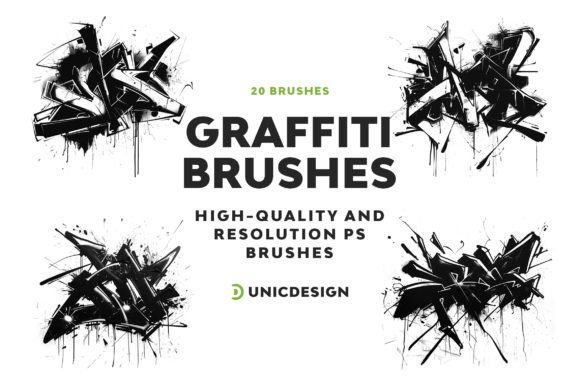
For digital artists and graphic designers seeking to infuse their work with the vibrant energy of street art, Graffiti Photoshop Brushes offers a compelling toolkit. This collection of 20 high-resolution brushes is designed to replicate the texture, spontaneity, and visual punch of real-world graffiti. With each brush crafted at approximately 2000px, the level of detail and scalability supports both large-format prints and intricate digital illustrations. Whether you're a seasoned illustrator or a novice experimenting with urban aesthetics, these brushes aim to bridge the gap between traditional graffiti and digital creativity.
What Sets Graffiti Photoshop Brushes Apart?
At its core, Graffiti Photoshop Brushes is built for authenticity. Unlike generic brush sets that offer stylized approximations, this collection captures the nuances of spray-paint textures, drips, and layering techniques commonly seen in street art. Each brush is curated to reflect a different aspect of graffiti culture, from stencil effects to dripping tags and bold throw-ups. This attention to realism makes the set particularly appealing to artists who want to convey a sense of raw urban energy without needing physical spray cans or walls to tag.
Another distinguishing feature is the inclusion of a comprehensive Readme file, which provides clear instructions for integrating the brushes into Adobe Photoshop. Compatibility spans from CS6 to the latest CC 2022 version, ensuring accessibility across a wide range of users. Additionally, the promise of 24/7 support adds a layer of reassurance for those who may encounter technical hurdles or workflow questions.
Comparing Digital Graffiti Tools
When evaluating digital graffiti tools, Graffiti Photoshop Brushes falls into a category that balances ease of use with creative depth. There are numerous alternatives in the digital art space, ranging from free downloadable brush sets to more complex vector-based graffiti generators. However, many of these options either sacrifice resolution for accessibility or require additional plugins and learning curves.
Free brush packs, for example, often lack the high resolution and curated variety found in Graffiti Photoshop Brushes. While they may be suitable for quick mockups or experimental sketches, they typically don't hold up well in professional settings where detail and scalability matter. On the other hand, more advanced graffiti software or vector tools may offer greater customization but demand a steeper learning curve and more time investment.
What makes Graffiti Photoshop Brushes stand out is its straightforward integration with Photoshop, a widely used platform among digital artists. This compatibility means users can immediately apply the brushes within their existing workflows without needing to learn new software or file formats.
Strengths and Tradeoffs
One of the strongest assets of Graffiti Photoshop Brushes is its high-resolution output. At 2000px, each brush maintains clarity even when scaled up for posters, murals, or web banners. This makes the set especially useful for designers working on commercial projects that require sharp, impactful visuals. The diversity of brush styles also allows for layering and blending techniques that mimic real graffiti compositions.
However, like any creative tool, there are tradeoffs to consider. Because the brushes are designed to emulate real-world graffiti textures, they may not be ideal for minimalist or clean-line aesthetics. Artists who prefer hyper-realistic renderings or those working in a strictly technical illustration style might find the organic, edgy nature of these brushes less applicable.
Additionally, while the brushes are user-friendly, achieving the most authentic results still requires some understanding of Photoshop’s brush dynamics and layering techniques. Those completely new to digital painting may need to invest time in learning how to adjust opacity, flow, and blending modes to get the most out of the toolset.
Best Fit Scenarios
Graffiti Photoshop Brushes is particularly well-suited for designers and illustrators working in urban-themed projects, such as album covers, event posters, branding for youth-oriented products, or social media visuals that require a gritty, streetwise edge. It's also a strong option for educators or hobbyists who want to explore graffiti-inspired art without the legal or logistical challenges of real-world tagging.
For freelance artists who frequently work on client projects with tight deadlines, the efficiency of these brushes can be a significant advantage. Rather than manually replicating graffiti textures, the brushes allow for quick application and customization, saving time while maintaining visual impact.
When to Consider Alternatives
If your creative goals lean toward photorealistic graffiti or require extensive animation capabilities, Graffiti Photoshop Brushes may not be the optimal choice. In such cases, vector-based graffiti tools or specialized 3D graffiti software could offer more flexibility and scalability across different media types.
Additionally, if you're working in a design environment that doesn't support Photoshop or if you're using a different platform like Illustrator or Procreate, compatibility becomes a limiting factor. While Photoshop remains a dominant tool in digital illustration, users of alternative software may need to seek brushes tailored to those specific platforms.
Practical Comparisons and Real-World Use
Consider a graphic designer tasked with creating a promotional poster for a music festival. Using Graffiti Photoshop Brushes, they can quickly generate bold, stylized lettering and background textures that evoke the energy of underground street performances. In contrast, using a free brush set might result in pixelated edges or inconsistent spray effects, detracting from the overall impact.
Similarly, a digital artist working on a character design with a streetwear brand could layer multiple brushes to create a jacket design that mimics real graffiti tags and stencils. This approach is more efficient than hand-drawing each texture or sourcing images from photo libraries, which could raise copyright concerns.
Making an Informed Choice
When evaluating digital graffiti tools, it's important to align your choice with both your technical setup and creative objectives. Graffiti Photoshop Brushes offers a well-rounded package for those working within Photoshop and seeking to incorporate authentic urban textures into their work. Its combination of high resolution, usability, and support makes it a practical option for many digital artists.
However, if your workflow involves multiple software platforms, or if you require more advanced customization features beyond what Photoshop brushes can provide, exploring alternative tools may be worthwhile. Ultimately, the best choice depends on your specific project needs, technical environment, and personal artistic style.