Ink in Water Photoshop Brushes: A Creative Essential for Digital Artists
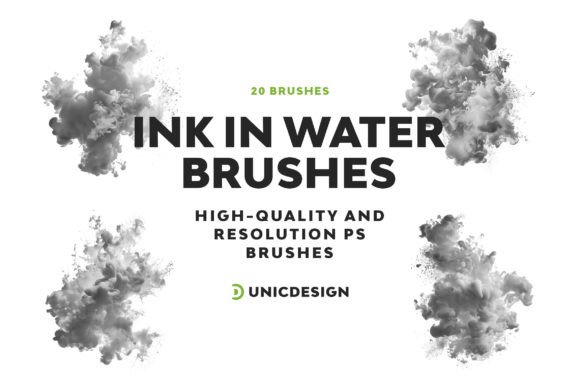
For digital artists, designers, and creators seeking to add a touch of organic elegance to their work, Ink in Water Photoshop Brushes offer a unique and versatile solution. These 20 meticulously crafted brushes simulate the fluid beauty of ink dispersing through water, giving users the ability to create visually rich textures and effects. Whether you're working on illustrations, photo manipulations, or digital paintings, this brush set can elevate your creative output with minimal effort and maximum impact.
What Are Ink in Water Photoshop Brushes?
Ink in Water Photoshop Brushes are a specialized collection of 20 digital brushes designed for Adobe Photoshop. Each brush mimics the natural diffusion of ink in water, capturing subtle variations in flow, opacity, and texture. These brushes are crafted at a high resolution of approximately 2000 pixels, ensuring crisp and detailed results even in large-scale projects.
Unlike generic brush sets, these tools are developed with precision to replicate the dynamic behavior of real ink. This realism makes them ideal for artists aiming to blend traditional aesthetics with modern digital techniques.
Key Features of Ink in Water Photoshop Brushes
- High-resolution quality – Each brush is rendered at approximately 2000 px for sharp, detailed strokes.
- Variety of effects – The set includes multiple versions of ink dispersion, from soft swirls to bold splashes.
- User-friendly setup – A detailed Readme file is included to guide users through installation and usage.
- Compatibility – Works seamlessly with Photoshop versions from CS6 to CC 2022.
- 24/7 support – Access to ongoing assistance for any questions or issues related to the brushes.
Who Can Benefit from Using These Brushes?
Ink in Water Photoshop Brushes are suitable for a wide range of creative professionals and hobbyists. Here are some examples of users who can benefit from incorporating this brush set into their workflow:
- Graphic designers – Enhance logos, backgrounds, and branding materials with fluid ink effects.
- Illustrators – Add depth and movement to character designs or environmental elements.
- Photographers – Use ink overlays to create dramatic transitions or artistic photo edits.
- Web designers – Integrate organic textures into website backgrounds or UI elements.
- Print artists – Create custom patterns, greeting cards, or packaging designs with a painterly touch.
Real-World Applications of Ink in Water Brushes
Let’s explore a few practical scenarios where these brushes can make a significant difference:
- Wedding invitations – Use soft ink strokes to create elegant watercolor-style designs.
- Book covers – Blend ink textures with typography for a vintage or artistic aesthetic.
- Album art – Combine ink effects with digital illustrations to evoke emotion and movement.
- Marketing materials – Apply ink overlays to banners or social media graphics for a distinctive look.
How to Get Started with Ink in Water Photoshop Brushes
Getting started with this brush set is straightforward. After downloading, users can follow the instructions in the included Readme file to install the brushes into Photoshop. Once installed, they can be accessed like any other brush in the software. Here are a few tips to maximize their potential:
- Experiment with blending modes – Try using the brushes with different layer blending options like Multiply, Screen, or Overlay.
- Adjust opacity and flow – Fine-tune settings to achieve subtle or bold ink effects.
- Combine with other textures – Layer ink strokes with paper textures or scanned brushwork for added depth.
Pros and Cons of Using Ink in Water Photoshop Brushes
Like any creative tool, it's important to understand both the advantages and potential limitations of using these brushes:
Pros:- High-quality, realistic ink effects
- Easy to install and use, even for beginners
- Excellent compatibility across Photoshop versions
- Dedicated support for troubleshooting and guidance
- Limited to Photoshop use only
- May require some experimentation to achieve desired results
Evaluating Suitability for Your Projects
When considering whether to use Ink in Water Photoshop Brushes, it’s important to evaluate your project’s visual goals and technical requirements. If you're aiming for a design that blends modern and traditional aesthetics, or if you want to add organic movement to a digital composition, these brushes are an excellent choice.
However, if your project demands a more rigid or geometric style, or if you're using software other than Photoshop, you may want to explore alternative tools. Always consider the format, resolution, and intended use of your final output before committing to a specific brush set.
Why Ink in Water Photoshop Brushes Stand Out
What sets this brush collection apart is its attention to detail and the natural fluidity of each stroke. Unlike mass-produced brushes that can appear repetitive or artificial, these brushes deliver unique, dynamic effects that enhance authenticity in digital work. Whether you're aiming for a minimalist aesthetic or a complex layered composition, these brushes provide the flexibility and quality needed to bring your vision to life.
Conclusion
Ink in Water Photoshop Brushes are more than just a digital tool—they are a gateway to expressive, fluid design. With their high-resolution detail, intuitive usability, and wide range of applications, these brushes empower creators to explore new artistic dimensions. Whether you're a seasoned professional or a passionate beginner, integrating this brush set into your toolkit can unlock fresh possibilities for your creative projects.
By understanding how to leverage the unique characteristics of these brushes, you can craft compelling visuals that stand out in today’s competitive design landscape. So, unleash your creativity and let the flowing elegance of ink in water transform your digital artistry.