Procreate Calligraphic Brushes v: A Creative Tool for Custom Typography and Lettering
If you're a digital artist, designer, or lettering enthusiast, you've probably heard of Procreate Calligraphic Brushes v. This brush set is specifically designed for creators who want to add elegant, hand-drawn calligraphy to their digital projects. Unlike generic brush sets, this collection offers a unique ribbon-shaped tip that mimics traditional calligraphy tools, giving your work a natural, flowing look. Whether you're designing logos, creating social media graphics, or crafting personalized invitations, these brushes help bring your vision to life with precision and style.
What’s Included in the Brush Set?
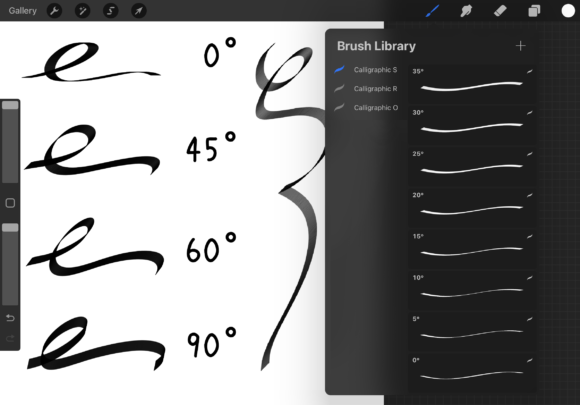
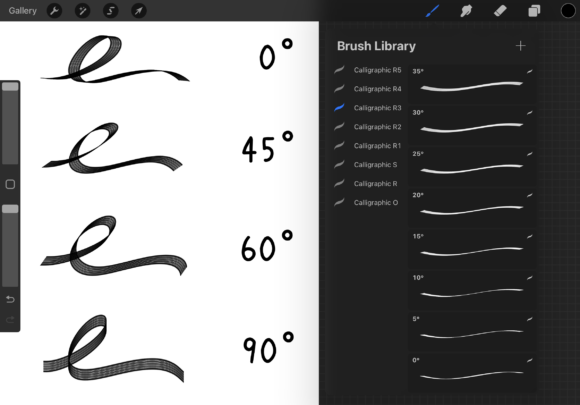
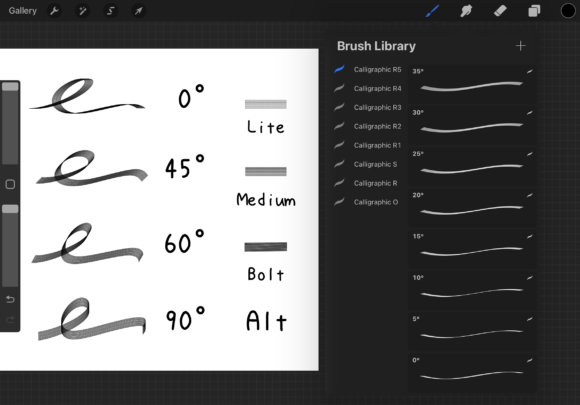
The Procreate Calligraphic Brushes v set includes 37 individual brushes, each angled from 0° to 180° in 5° increments. This range allows for a wide variety of stroke angles and directional control, making it easier to achieve the exact look you're aiming for. Along with the standard brushes, you also get one alternate brush and one bonus brush that serves as a guide for adjusting the tip shape and opacity. All brushes are built using Procreate 5.3.6, ensuring compatibility and smooth performance across supported devices.
How to Customize Brush Tips and Opacity
One of the standout features of this brush set is the included guide brush, which helps users modify the tip shape and opacity settings. To change the tip, simply open the brush studio, select the guide brush, and adjust the grain or shape settings to your preference. If you want softer strokes, lower the opacity in the "Opacity" section under the "Apple Pencil" menu. This flexibility allows you to fine-tune each brush for different projects—whether you need bold strokes for headings or delicate lines for flourishes.
Perfect for Digital Calligraphy and Hand Lettering
Many creators use Procreate Calligraphic Brushes v for hand lettering projects, especially those who run small businesses or manage social media accounts. For example, a wedding planner might design custom digital invitations using these brushes to add a personal, elegant touch. Similarly, a content creator could use them to stylize quotes or captions in Instagram stories. The ribbon-shaped tip mimics the behavior of real ink pens, making it easier to achieve pressure-sensitive strokes and realistic textures.
Use in Logo Design and Branding Projects
Graphic designers often look for tools that blend professionalism with a handcrafted feel. Procreate Calligraphic Brushes v fits that need perfectly. You can use these brushes to draft logo concepts, create signature-style typography, or design brand assets like packaging labels or custom icons. Because each brush is angle-specific, you can maintain consistency in your lettering while experimenting with different slants and stroke weights. This level of control is especially useful when designing logos that need to feel both modern and personal.
Helpful for Educators and Digital Content Creators
Teachers and educators who create digital learning materials can also benefit from these brushes. Whether you're designing worksheets, flashcards, or presentation slides, the Procreate Calligraphic Brushes v set helps you add handwritten-style text that’s easy to read and visually engaging. For example, a language instructor might use these brushes to highlight key vocabulary in a digital lesson. Similarly, a YouTube creator who makes tutorial videos could use them to annotate visuals or create custom thumbnails with stylized text.
Commercial and Freelance Design Applications
Freelance designers and small business owners frequently use digital tools to create client deliverables quickly and efficiently. With Procreate Calligraphic Brushes v, you can streamline your workflow by integrating hand-drawn elements directly into your digital canvas. Whether you're designing greeting cards, packaging labels, or website headers, these brushes allow for a high degree of customization without requiring advanced drawing skills. Clients often appreciate the personal touch that comes with hand-lettered designs, making this brush set a valuable asset for professionals in creative industries.
Considerations Before Downloading or Using
Before diving into Procreate Calligraphic Brushes v, it's worth considering your skill level and project needs. If you're new to Procreate or digital lettering, start with the lower-degree brushes, which offer a gentler learning curve. More experienced users may appreciate the full range of angles for advanced compositions. Also, keep in mind that these brushes are optimized for use with the Apple Pencil—while they work with other styluses, pressure sensitivity and tilt responsiveness may vary.
Real-World Examples of Brush Usage
- A blogger designing a custom quote graphic for Pinterest might use a 30° brush for a clean, slanted script style.
- A calligrapher practicing digital lettering could use the 90° brush for upright serif-style letters.
- An artist creating a digital comic might use the 150° brush for dramatic, flowing titles or speech bubbles.
- A small business owner designing a logo might test multiple angles to find the most balanced look for their brand name.
Why This Brush Set Stands Out
Unlike many generic brush packs, Procreate Calligraphic Brushes v is thoughtfully designed with real-world applications in mind. Each brush is created with a specific purpose—giving you the flexibility to choose the right tool for your project. The ribbon-shaped tip responds naturally to pressure and tilt, making your strokes feel more like traditional pen work. Whether you're a beginner or a seasoned designer, this brush set helps you achieve professional-level results without the learning curve of complex design software.
Final Thoughts
If you're looking for a versatile, high-quality brush set that supports a wide range of creative tasks, Procreate Calligraphic Brushes v is worth exploring. From digital lettering to logo design and educational content creation, these brushes adapt to your workflow and artistic style. The included customization guide makes it easy to tweak settings for different effects, and the angle-specific design ensures precision in every stroke. Whether you're a hobbyist or a professional, this brush set is a practical addition to your digital toolkit.