Procreate Calligraphic Brushes iii for Creative Lettering
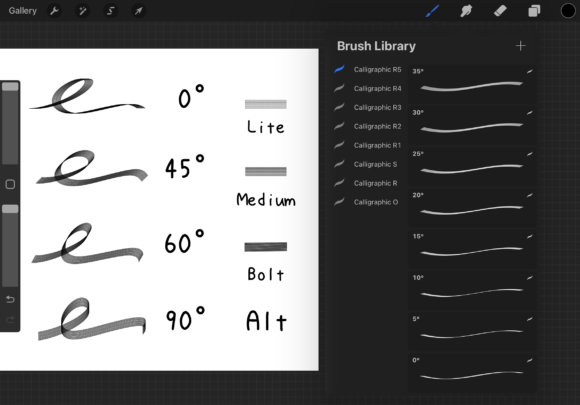
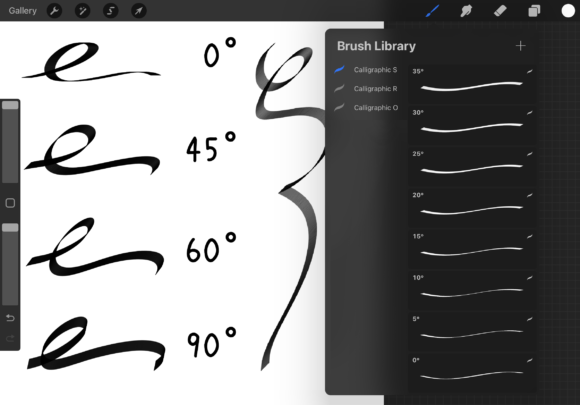
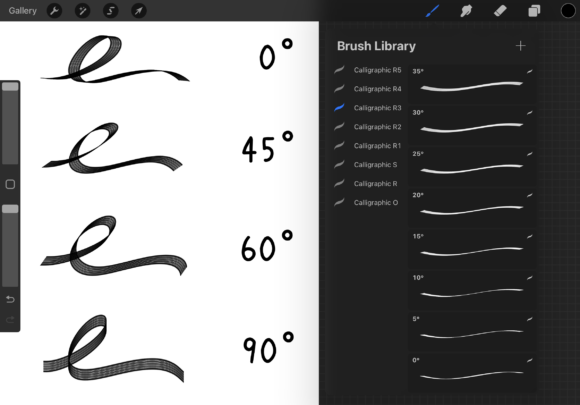
Procreate Calligraphic Brushes iii is a versatile brush set designed for artists, designers, and lettering enthusiasts who want to create elegant, ribbon-shaped calligraphy directly on their iPad using Procreate 5.3.6. This set includes 37 ribbon-style brushes, each angled from 0° to 180° in 5° increments, giving you full control over stroke direction and flow. Whether you're a beginner exploring digital calligraphy or a professional looking to streamline your workflow, this brush set offers flexibility, precision, and creative freedom.
What Makes These Brushes Unique?
Each brush in Procreate Calligraphic Brushes iii is designed in a ribbon shape, allowing for smooth transitions and realistic calligraphic strokes. Unlike standard calligraphy brushes that require pressure sensitivity or tilt adjustments, these brushes are built with angle variations baked in. This means you can easily match the brush angle to your lettering style or writing direction without adjusting settings mid-stroke.
The set also includes an alternate brush and a bonus guide brush that demonstrates how to modify the tip shape and opacity settings. This feature is especially useful for users who want to customize their brushes for different projects or adapt the brushes to their personal style.
Why Artists and Designers Love This Brush Set
If you're into hand-lettering, typography, or digital calligraphy, having the right tools makes a big difference. Procreate Calligraphic Brushes iii offers a consistent and natural writing experience that mimics traditional calligraphy pens. The ribbon shape helps create strokes that are thick in one direction and thin in another, which is essential for classic calligraphy styles.
- Consistent results: Each brush is angle-specific, so you can rely on clean, predictable strokes.
- Customization ready: With the bonus brush and guide, you can tweak brush tips and opacity to suit your preferences.
- Easy to use: No need to adjust settings constantly—just pick the right angle and start writing.
How to Change the Brush Shape and Opacity
One of the standout features of Procreate Calligraphic Brushes iii is its built-in guide for modifying brush characteristics. To change the shape or opacity:
- Open the brush studio in Procreate.
- Select the alternate brush included in the set.
- Under the "Shape" tab, adjust the grain or scattering settings to alter the tip appearance.
- In the "Opacity" section, tweak sliders to control how transparent or bold your strokes appear.
Where and How to Use These Brushes
Procreate Calligraphic Brushes iii is ideal for a wide range of creative applications. Here are a few examples:
- Personal projects: Create custom greeting cards, journal entries, or personalized artwork with elegant calligraphy.
- Business branding: Design logos, social media posts, or marketing materials with hand-drawn lettering that feels authentic and unique.
- Educational use: Teachers and educators can use these brushes to create visually engaging worksheets, lesson plans, or presentations.
- Digital art: Combine these brushes with other tools in Procreate to add calligraphic elements to illustrations, comics, or digital paintings.
Getting Started: Tips for Beginners
If you're new to Procreate or digital calligraphy, here are a few tips to help you make the most of Procreate Calligraphic Brushes iii:
- Start with the basics: Practice forming letters with a few key brushes before diving into complex compositions.
- Use layers: Keep your background and lettering on separate layers so you can edit them independently.
- Experiment with angles: Try different brushes to see how each angle affects your stroke style and flow.
- Save your favorites: Once you find the brushes that work best for your style, pin them in your brush library for quick access.
Considerations Before Using
Before diving into Procreate Calligraphic Brushes iii, it's important to make sure your device and software are compatible. These brushes are specifically designed for Procreate 5.3.6, so they may not work as intended in older versions. Additionally, while the brushes are highly customizable, some settings may require a bit of trial and error to perfect.
If you're planning to use these brushes for commercial work, always check the licensing terms included with the brush set. Most Procreate brush sets are royalty-free for personal and commercial use, but it's good to confirm before publishing or selling your work.
Final Thoughts
Procreate Calligraphic Brushes iii is more than just a collection of digital tools—it's a creative companion for anyone interested in calligraphy, lettering, or typography. With its ribbon-shaped brushes, angle-specific design, and customization options, this set empowers artists of all levels to explore new styles and techniques. Whether you're designing for fun, business, or education, these brushes help bring your lettering ideas to life with elegance and ease.