Window Shadow Adobe PS Brushes
Elevate Your Design with Realistic Depth and Detail
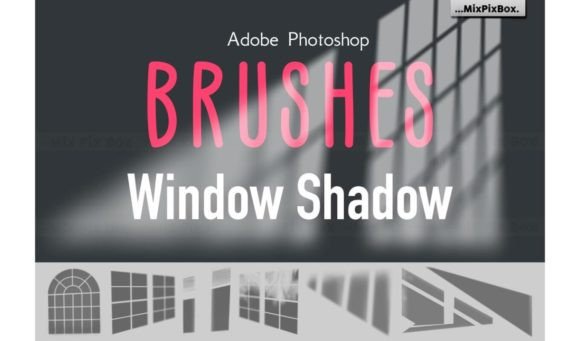
Adobe Photoshop users who regularly work with digital illustrations, mockups, or layered compositions know the importance of depth and realism. The Window Shadow Adobe PS Brushes offer a powerful yet intuitive way to add dimensionality and visual interest to your projects. These high-resolution brushes simulate authentic window shadows, helping designers create more immersive and polished visuals with minimal effort.
What Makes Window Shadow Adobe PS Brushes Stand Out?
Unlike generic shadow brushes that lack realism or require extensive tweaking, the Window Shadow Adobe PS Brushes are crafted with precision and flexibility in mind. Each of the 18 included brushes is built at resolutions ranging from 2500 to 5000 pixels, ensuring sharp, detailed results even in high-quality print and web work. The brushes are saved in the widely supported .abr format, making them compatible with all current versions of Adobe Photoshop.
These brushes are designed for ease of use—no need to manually adjust opacity, angle, or diffusion. Just select the brush that fits your scene and apply it directly to your composition. The result is a natural, realistic shadow that blends seamlessly with your design elements.
Practical Uses Across Design Disciplines
Whether you're a freelance graphic designer, a digital marketer, or an educator creating visual content, the Window Shadow Adobe PS Brushes can enhance your workflow. Here are a few real-world applications:
- Product Mockups: Add believable window shadows to digital product displays for e-commerce or portfolio presentations.
- UI/UX Design: Simulate natural lighting and depth in interface mockups to improve realism and user perception.
- Architectural Visualization: Quickly apply window shadows to interior scenes to show how natural light interacts with space.
- Social Media Graphics: Use subtle shadow effects to give flat images a more dynamic and engaging appearance.
- Print Design: Enhance posters, flyers, or book covers with dimensional effects that draw the eye and add visual intrigue.
Why Realistic Shadows Matter
Shadows are more than just aesthetic flourishes—they help establish spatial relationships between objects in a design. A well-placed shadow can make a floating element appear grounded, or a flat image seem three-dimensional. This subtle realism can significantly improve the overall quality and professionalism of your work.
With the Window Shadow Adobe PS Brushes, you’re not just adding shadows—you’re enhancing the believability and visual storytelling of your compositions. Whether you're designing a website mockup or a magazine layout, these brushes help your work stand out by adding depth without overwhelming the viewer.
How These Brushes Improve Workflow Efficiency
Time is a valuable resource for any creative professional. The Window Shadow Adobe PS Brushes streamline the shadow-creation process, eliminating the need for complex layer styles or manual painting. This means you can focus more on the creative aspects of your project and less on technical execution.
Additionally, because the brushes are pre-configured for optimal performance, you can apply them directly without adjusting multiple settings. They also scale well, so you can use them across a variety of canvas sizes and resolutions without compromising quality.
Compatibility and Ease of Use
One of the biggest advantages of the Window Shadow Adobe PS Brushes is their universal compatibility. Whether you're using the latest version of Photoshop or a slightly older one, you can load and use these brushes without any issues. Installation is straightforward: simply load the .abr file into Photoshop, and the brushes will appear in your brush panel.
They also work well with other Photoshop tools like layer masks, adjustment layers, and blending modes, giving you the flexibility to fine-tune shadows to match your scene’s lighting and perspective.
Designing with Purpose: Real-World Examples
Let’s look at a few specific examples of how these brushes can be used effectively:
- Interior Design Visualization: When designing a room layout, applying a window shadow can instantly show how light enters the space. This helps clients visualize the ambiance and functionality of the design.
- Photography Composites: If you're blending a subject into a new background, using a matching window shadow can help anchor the subject and make the composite feel more natural.
- Brand Identity Mockups: Adding realistic shadows to logo or packaging mockups gives a more premium feel, which is especially important when presenting to clients or launching a new product.
- Blog Graphics and Infographics: Subtle shadow effects can guide the viewer’s eye and make information more digestible, improving engagement and readability.
Choosing the Right Brush for Your Project
Each of the 18 brushes in the set is designed to simulate a different type of window shadow—some are soft and diffused, while others are sharp and directional. It's helpful to experiment with a few options to see which one best matches the lighting in your scene.
Also, consider the angle and intensity of the light source in your composition. Photoshop’s brush settings allow you to adjust opacity, flow, and blending modes to further customize the shadow effect. Don’t be afraid to layer multiple brushes or combine them with gradient overlays for a more complex, realistic result.
Final Thoughts: A Must-Have Tool for Designers
The Window Shadow Adobe PS Brushes are more than just a design asset—they’re a practical tool that can elevate your work and streamline your workflow. Whether you're a seasoned professional or just starting out, incorporating these brushes into your design process can help you achieve more polished, realistic results with less effort.
If you're looking for a way to add depth, realism, and visual interest to your designs without spending hours on shadow effects, these brushes are definitely worth exploring. They offer a level of quality and flexibility that’s hard to find in generic brush sets, and they’re built to support a wide range of creative applications.