Enhancing Digital Art with Ink Art Photoshop Brushes
Introduction to Ink Art Photoshop Brushes
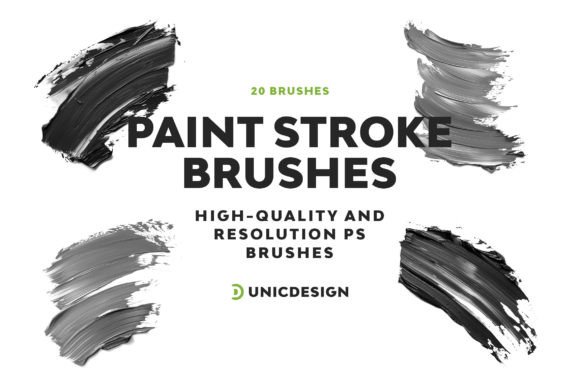
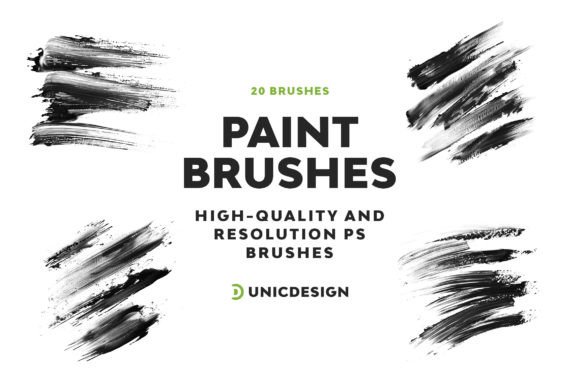
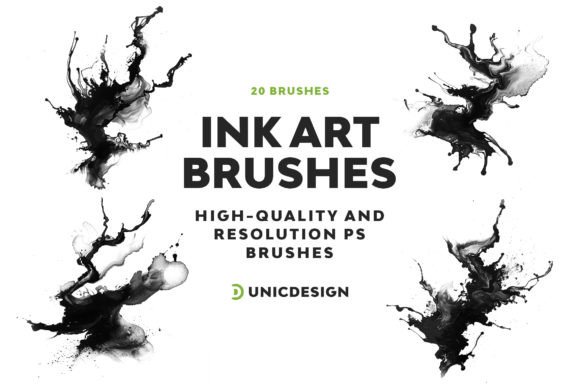
For digital artists, illustrators, and graphic designers, the ability to simulate traditional media within modern software is a game-changer. Adobe Photoshop, with its vast array of tools and customization options, allows creators to explore a wide range of artistic styles. One such enhancement comes in the form of the Ink Art Photoshop Brushes, a set of 20 high-resolution brushes designed to replicate the texture and flow of real ink on paper.
These brushes offer a seamless blend of realism and digital flexibility, making them an essential addition to any creative’s toolkit. Whether you're working on concept art, comic illustrations, or branding materials, the Ink Art Photoshop Brushes can elevate your work by adding depth, character, and authenticity.
Key Features of Ink Art Photoshop Brushes
Each brush in the Ink Art Photoshop Brushes set is crafted with attention to detail and optimized for performance. Here are some of the standout features that make these brushes a valuable asset:
- High-Quality Resolution: Each brush is designed at 2000 pixels, ensuring crisp and clean results even at large print sizes or high-resolution digital displays.
- Simple and Intuitive: The brushes are easy to install and use, requiring no complex setup or configuration. Just load them into Photoshop and start creating.
- 20 Unique Ink Art Brush Versions: The set includes a variety of textures and stroke types, from splatters and drips to calligraphic strokes and blotches, giving you creative freedom to experiment.
- Readme File Included: A detailed guide is provided to help users understand how to install and utilize the brushes effectively.
- 24/7 Unlimited Support: Should you encounter any issues or have questions about the brushes, dedicated support is available to assist you at any time.
Compatibility Across Photoshop Versions
One of the most important considerations when choosing digital brushes is compatibility. The Ink Art Photoshop Brushes are compatible with a wide range of Adobe Photoshop versions, including:
- Photoshop CS6
- Photoshop CC
- Photoshop CC 2015.5
- Photoshop CC 2017 through CC 2022
This broad compatibility ensures that whether you're using an older version or the latest release, you can integrate these brushes into your workflow without concern. It also makes them ideal for collaborative environments or teams that may be using different software versions.
Practical Applications of Ink Art Brushes
The versatility of the Ink Art Photoshop Brushes makes them suitable for a wide array of creative projects. Below are some of the most common and impactful use cases:
Comic and Graphic Novel Illustration
Creating dynamic inks for comic panels is one of the most natural applications for these brushes. They allow artists to simulate the look of brush-painted inks, pen lines, and tonal shading without the need for scanning physical artwork. The texture and grain provided by the brushes enhance the storytelling and visual depth of the panels.
Digital Painting and Concept Art
Concept artists and digital painters often rely on texture brushes to add realism and depth to their work. The Ink Art Photoshop Brushes can be used to create dramatic backgrounds, atmospheric effects, or layered textures that give digital paintings a more tactile and organic feel.
Typography and Logo Design
For designers working on branding or logo projects, these brushes can add a hand-crafted, inked look to text elements. Whether it's a vintage-style logotype or a stylized headline, the ink textures can help differentiate a design and make it stand out from more polished, vector-based alternatives.
Photo Manipulation and Texturing
Adding ink overlays or texture layers to photographs can create compelling visual effects. These brushes are ideal for blending digital photos with inked elements, giving images a mixed-media or distressed aesthetic that’s popular in editorial and advertising design.
How to Get the Most Out of Ink Art Photoshop Brushes
While the Ink Art Photoshop Brushes are easy to use, there are a few techniques and best practices that can help you maximize their potential:
- Experiment with Blend Modes: Try overlaying ink textures using different blend modes like Multiply, Overlay, or Soft Light to create depth and dimensionality.
- Adjust Brush Settings: Each brush can be customized in Photoshop’s brush panel. Play with spacing, scattering, and opacity to achieve different effects.
- Combine with Other Tools: Use the ink brushes in conjunction with Photoshop’s eraser, smudge, or burn tools to refine your artwork and create more natural transitions.
- Use Layer Masks: Applying ink textures on separate layers with masks allows for non-destructive editing and easy adjustments later in the workflow.
Who Can Benefit from These Brushes?
The Ink Art Photoshop Brushes are not limited to a specific niche within the creative community. Their flexibility and high quality make them useful for a wide range of professionals and hobbyists:
- Professional Illustrators: For those working on commercial or editorial projects, these brushes provide a polished, professional finish with minimal effort.
- Graphic Designers: Designers can incorporate ink textures into branding, packaging, and advertising materials to add a tactile and expressive element.
- Art Educators and Students: These brushes serve as a great tool for teaching digital illustration techniques and exploring traditional media in a digital environment.
- Hobbyists and Enthusiasts: Whether you're creating personal artwork or digital journal entries, these brushes can help you achieve a more expressive style without needing physical materials.
- Photographers and Mixed Media Artists: Ink overlays and textures can be used to enhance digital photography and create compelling visual narratives.
Real-World Examples and Observations
Many digital artists have found success integrating the Ink Art Photoshop Brushes into their creative processes. For instance, a freelance illustrator working on a children’s book used the ink splatter and brushstroke textures to create a whimsical, hand-painted look that resonated well with the target audience.
In another case, a branding agency used the ink brushes to design a retro-style logo for a new coffee shop. By applying a textured ink overlay to the typography, they achieved a unique, hand-crafted aesthetic that stood out in a competitive market.
These examples highlight how the brushes can be adapted to different styles and industries, proving their value as a versatile tool for creative professionals.
Conclusion and Final Thoughts
The Ink Art Photoshop Brushes offer a compelling solution for artists and designers looking to incorporate the richness of ink into their digital work. With high-quality resolution, ease of use, and broad compatibility, they provide a practical and effective way to enhance your creative output.
Whether you're aiming to replicate the look of traditional media, add depth to your digital paintings, or create unique textures for design projects, these brushes are a worthy investment. And with the included support and documentation, you can feel confident in your ability to get the most out of them from day one.