Oil Paint Procreate Brushes for Realistic Digital Art
Bringing Traditional Oil Painting to Your iPad
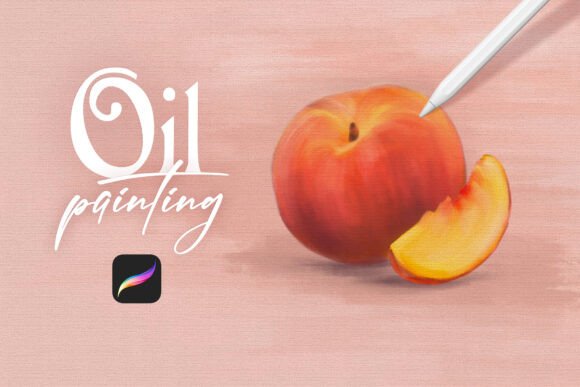
For artists who miss the rich textures and expressive strokes of oil painting, Oil Paint Procreate Brushes offer a digital alternative that feels authentic and responsive. This brush set includes 12 realistic oil brushes designed specifically for the Procreate app, allowing artists to replicate the tactile experience of traditional oil painting on an iPad. Whether you're sketching, blending, or building thick impasto layers, these brushes respond like real oil on canvas, giving your digital art a more organic and dimensional quality.
One standout feature is the included canvas brush, which mimics the grain and surface texture of actual canvas. This adds depth and realism to your artwork, especially when combined with layering techniques. The brushes are easy to install—just download the .brushset files and Procreate will automatically add them to your brush library. From there, they’re ready to use right away, appearing at the top of your brush list for quick access.
Why Different Artists Appreciate Oil Paint Procreate Brushes
Artists come to digital painting with different goals, skills, and expectations. Here's how different groups may find value in this brush set:
- Beginners appreciate the intuitive way these brushes behave. They respond naturally to pressure and stroke direction, making it easier to learn oil painting techniques without the mess of real paint.
- Professional artists value the ability to simulate high-quality oil textures in digital work. This can be especially useful for concept art, commissions, or preparing illustrations for print.
- Art educators find these brushes helpful for teaching oil painting fundamentals digitally, especially in hybrid or remote learning environments.
- Content creators enjoy the visual appeal of oil brushstrokes in time-lapse videos and tutorials, which can make digital art process videos more engaging.
- Hobbyists love the tactile feel of the brushes, which makes digital painting feel more like a traditional studio experience.
How to Choose the Right Brush for Your Style
Each brush in the set serves a specific purpose, from thin glazes to thick impasto marks. Experimenting with different brushes helps you understand how they respond to pressure, speed, and layering. For example, the palette knife brush gives a bold, textured stroke ideal for expressive backgrounds, while the soft oil brush blends beautifully for smooth transitions and atmospheric effects.
If you're transitioning from traditional painting, you may find it helpful to start with brushes that mimic your favorite physical tools. If you're a digital native, you might enjoy exploring how these brushes can add depth and realism to your existing workflow.
What Matters Most: Priorities Across User Types
Depending on your goals, you’ll care about different aspects of the brush set:
- Beginners often prioritize ease of use and intuitive behavior. They want brushes that feel natural without too much tweaking.
- Professionals focus on quality, consistency, and how well the brushes integrate into their workflow. They may also care about how the final artwork translates across different media.
- Educators look for brushes that clearly demonstrate oil painting techniques and can be used effectively in lessons or demonstrations.
- Business owners or marketers may evaluate the brushes based on their ability to produce visually rich content for branding, packaging, or promotional materials.
- Consumers and hobbyists often care most about the overall experience—how enjoyable and satisfying the brushes feel to use.
Practical Uses Across Creative Fields
Here are a few ways different creators use Oil Paint Procreate Brushes in real-world scenarios:
- Illustrators use the thick oil brushes to create textured backgrounds for book covers or editorial illustrations.
- Concept artists rely on the canvas brush to give their digital sketches a more painterly, production-ready look.
- Art teachers demonstrate oil blending techniques using Procreate's layer system alongside these brushes to simulate real paint mixing.
- Freelance designers incorporate oil textures into logos or branding elements to add a hand-painted feel.
- Digital painters blend multiple brushes in the set to build up rich, layered compositions with depth and movement.
Getting Started: Installation and Tips
Installing the brushes is simple. Once downloaded, just tap the .brushset file and Procreate will import all 12 brushes automatically. They appear at the top of your brush list, making them easy to access during your workflow.
Here are a few tips to get the most out of the set:
- Use the canvas brush as a base layer to simulate real canvas before painting over it.
- Experiment with layer blending modes to enhance texture and depth.
- Adjust opacity and flow settings to control how thick or thin the paint appears.
- Try using the palette knife brush for bold, expressive strokes in abstract or impressionist work.
- Combine multiple brushes in the set to build up realistic oil effects in portraits or still life compositions.
Is Oil Paint Procreate Brushes Right for You?
If you're looking to bring the richness of oil painting into your digital work, this brush set is a strong choice. It’s especially valuable if you appreciate the tactile qualities of traditional media but want the flexibility of digital tools. Whether you're a beginner learning the ropes or a seasoned pro looking for expressive tools, these brushes offer something for a wide range of artists.
However, if you're focused on clean, minimal digital styles or need brushes optimized for speed rather than texture, this set may not be your top priority. It’s best suited for those who want to explore the expressive potential of oil-like strokes in their digital art.
Ultimately, the best way to know if these brushes work for you is to try them out. See how they respond to your style, experiment with different techniques, and decide whether they help you achieve the look and feel you're aiming for.