Bubbles Photoshop Brushes
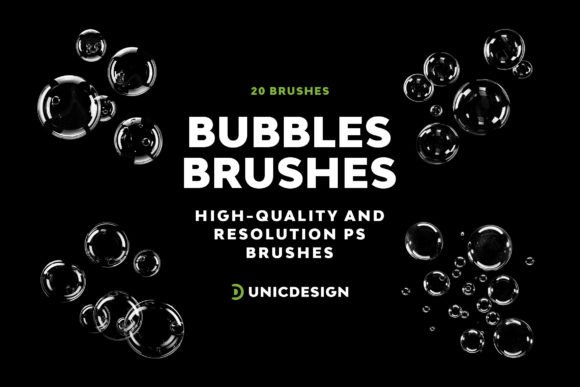
Designing with depth and dimension doesn’t always require complex tools. Sometimes, the right brush can transform a flat layout into something immersive and visually rich. Bubbles Photoshop Brushes offer exactly that—20 high-resolution brushes crafted to bring a sense of lightness, movement, and elegance to your creative work. Whether you're designing for print, digital media, or personal projects, these brushes provide a versatile way to enhance your visuals with realistic, high-quality bubble effects.
What Makes Bubbles Photoshop Brushes Stand Out
Each brush in this collection is designed with precision, supporting resolutions up to 2000 px. This level of detail ensures that your designs remain crisp and professional, even at large scales. The 20 distinct bubble variations allow for subtle nuances in texture and form, giving you the flexibility to match the mood of your project. From soft, airy bubbles to more defined, glossy spheres, this set covers a full range of visual styles.
What sets these brushes apart isn’t just their resolution or variety—it’s the attention to usability. A clear Readme file is included to help you quickly navigate the set and integrate the brushes into your workflow. Whether you're a seasoned designer or just starting out, you’ll appreciate how smoothly these assets fit into your existing Photoshop environment, from CS6 to CC 2022 and beyond.
Where Bubbles Photoshop Brushes Shine
These brushes are incredibly adaptable, making them ideal for a wide range of design applications. In branding and editorial design, they can be used to add visual interest to backgrounds, headers, or decorative elements without overwhelming the composition. For marketers and content creators, they offer a subtle yet effective way to highlight promotions or create engaging social media graphics with a touch of sophistication.
Product packaging and web design also benefit from the use of these brushes. Bubbles can suggest lightness, purity, or even luxury—depending on how they're applied. A beauty brand might use them to evoke a sense of effervescence in a product shot, while a wellness company could incorporate them to communicate calm and clarity. The same brush can be layered, blended, or adjusted to suit vastly different visual narratives.
How to Use Bubbles Photoshop Brushes Effectively
Like any design asset, the key to getting the most out of Bubbles Photoshop Brushes lies in thoughtful application. Start by considering the tone and purpose of your design. Are you aiming for a playful, whimsical feel or something more refined and elegant? The answer will guide which brush you choose and how you layer it with other elements.
Don’t be afraid to experiment with blending modes and opacity settings. A soft overlay can create a subtle background texture, while a multiply mode might give the bubbles more depth and realism. Pairing these brushes with complementary design assets—like soft gradients, light leaks, or minimalistic fonts—can elevate the overall aesthetic of your project.
When working on commercial designs, always check the licensing terms. Bubbles Photoshop Brushes are designed for both personal and commercial use, giving you peace of mind whether you're creating for a client or your own brand. Still, it's a good practice to keep track of which brushes you use and ensure they’re properly embedded or referenced in your final files.
Support and Compatibility
Even the best tools can sometimes raise questions, especially when integrating new assets into your workflow. That’s why Bubbles Photoshop Brushes come with unlimited 24/7 support. Whether you're unsure how to install the brushes or want help troubleshooting an effect, the support link included in the Readme file connects you directly with the team behind the product.
Compatibility is another area where this brush set excels. Designed to work seamlessly across a wide range of Photoshop versions, these brushes eliminate the frustration of outdated or unsupported files. You can confidently use them in your current projects and future ones, knowing they’ll remain functional as your software evolves.
Final Thoughts
Bubbles Photoshop Brushes are more than just a design tool—they're a creative enhancer that brings dimension, texture, and visual intrigue to your work. Whether you're a graphic designer, marketer, or small business owner, this brush set gives you the flexibility to explore new visual directions without compromising quality or professionalism. With clear documentation, broad compatibility, and responsive support, it’s a practical addition to any creative toolkit.