Paper Store Procreate Texture Brushes for Realistic Art
Digital art has come a long way, but many creators still miss the tactile, organic feel of working on physical paper. That’s where Paper Store - Procreate Texture Brushes comes in. This carefully curated set of 27 brushes brings the richness of real paper into your digital workflow, giving your artwork a grounded, handcrafted quality that stands out. Whether you're illustrating, lettering, or designing for print or screen, these brushes offer a subtle but powerful way to elevate your visuals.
What Makes These Brushes Unique
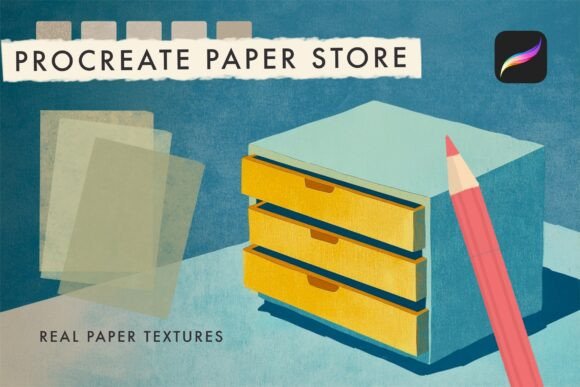
Each brush in the Paper Store - Procreate Texture Brushes collection is designed to mimic the grain, grain direction, and imperfections of actual paper. From rough watercolor textures to smooth newsprint finishes, the variety allows for nuanced control over your project’s aesthetic. Unlike generic brushes that can feel flat or artificial, these are built with attention to how ink and pigment interact with different paper surfaces.
The result? A digital texture that doesn’t overpower your work but instead enhances it with a sense of depth and authenticity. These brushes are especially valuable for artists aiming to blend digital efficiency with the warmth of traditional media.
Creative Applications Across Mediums
One of the biggest strengths of the Paper Store - Procreate Texture Brushes is their versatility. Here are a few ways different creators can apply them:
- Illustrators can layer textures over line work or color fills to simulate screen printing or ink bleed.
- Lettering artists can use rougher brushes to give hand-painted signs or vintage posters a tactile edge.
- Designers creating packaging or branding materials can add a paper finish to mockups for a more realistic presentation.
- Bloggers and educators who create digital handouts or infographics can use these brushes to give their visuals a more approachable, handmade feel.
These brushes also work well when combined with other digital tools. For example, you can apply a texture on a separate layer and adjust its opacity or blending mode to fine-tune the effect without altering your original artwork.
Designing for Different Audiences
Whether you're creating for clients, personal branding, or public platforms, the Paper Store - Procreate Texture Brushes can be adapted to suit various tones and formats. Here’s how different users might apply them:
- Freelancers pitching design concepts can use textured backgrounds to make their mockups feel more tangible and professional.
- Small business owners designing social media graphics can apply a subtle paper overlay to make their posts feel more organic and less digital.
- Content creators making tutorial visuals or sketchnotes can use these brushes to enhance readability and engagement without distracting from the message.
- Artists selling prints online can apply textures that mimic the physical medium they’re emulating, helping buyers better visualize the final product.
The key is to match the texture to the tone of your project. A rough, kraft paper texture might work well for a rustic brand identity, while a fine linen texture could lend sophistication to a minimalist design.
Getting the Most From Your Brushes
Using texture brushes effectively requires a balance between subtlety and impact. Here are some practical tips to help you get the most from the Paper Store - Procreate Texture Brushes:
- Layer wisely – Apply textures on separate layers so you can adjust or remove them without affecting your base artwork.
- Use blending modes – Multiply, Overlay, and Soft Light modes often work best for integrating textures naturally.
- Scale textures appropriately – Zoom in or out on a brush preview to match the scale of your canvas and avoid a repetitive or unnatural look.
- Combine with other brushes – Don’t be afraid to mix these with inking, shading, or painting brushes to build a cohesive visual style.
If you're creating a series of illustrations or a design system, consider choosing 2–3 core textures to use consistently. This helps maintain visual harmony while still giving your work a unique finish.
Real-World Project Ideas
Looking for inspiration on how to use the Paper Store - Procreate Texture Brushes? Here are a few project ideas to spark your creativity:
- Create a handmade-style editorial illustration by applying a watercolor paper texture over a digital ink drawing.
- Design a vintage-inspired logo using a rough paper brush to age the edges and give it a distressed look.
- Make a digital sketchbook feel more like a physical one by applying a light paper grain to every page background.
- Build a brand moodboard with textured swatches that reflect the tactile quality of packaging or printed materials.
These ideas can be adapted across industries and platforms. Whether you're posting on Instagram, preparing a client proposal, or publishing a digital zine, adding a touch of paper texture can make your visuals feel more intentional and grounded.
Why These Brushes Belong in Your Toolkit
The Paper Store - Procreate Texture Brushes aren’t just about aesthetics—they’re about enhancing your creative process. By giving you more control over the surface of your digital canvas, they help bridge the gap between analog warmth and digital precision. Whether you're a seasoned illustrator or a hobbyist exploring digital art for the first time, this brush set offers a simple but powerful way to refine your style and bring more character to your work.
And because they're built specifically for Procreate, they’re easy to install and use right away. Just download the .brushset file, import it into your app, and start experimenting. With 27 options to choose from, you’ll quickly find textures that become go-to tools in your creative workflow.